
Getting Started with a Simple Web PageListing 2.1 shows the text you would type and save to create a simple HTML page. If you opened this file with a web browser such as Internet Explorer, you would see the page shown in Figure 2.1. Every web page you create must include the <html>, <head>, <title>, and <body> tags. Listing 2.1. The <html>, <head>, <title>, and <body> Tags
<?xml version="1.0" encoding="UTF-8"?>
<!DOCTYPE html PUBLIC "-//W3C//DTD XHTML 1.1//EN"
  "http://www.w3.org/TR/xhtml11/DTD/xhtml11.dtd">

<html xmlns="http://www.w3.org/1999/xhtml" xml:lang="en">
  <head>
    <title>The First Web Page</title>
  </head>

  <body>
    <p>
      In the beginning, Tim created the HyperText Markup Language. The Internet
      was without form and void, and text was upon the face of the monitor and
      the Hands of Tim were moving over the face of the keyboard. And Tim said,
      Let there be links; and there were links. And Tim saw that the links were
      good; and Tim separated the links from the text. Tim called the links
      Anchors, and the text He called Other Stuff. And the whole thing together
      was the first Web Page.
    </p>
  </body>
</html>
Figure 2.1. When you view the web page in Listing 2.1 with a web browser, only the actual title and body text are displayed.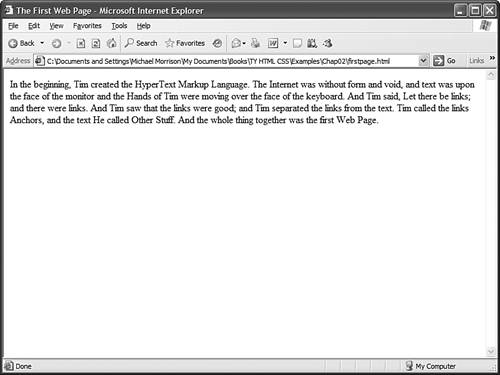 In Listing 2.1, as in every HTML page, the words starting with < and ending with > are actually coded commands. These coded commands are called HTML tags because they "tag" pieces of text and tell the web browser what kind of text it is. This allows the web browser to display the text appropriately. An HTML tag is a coded command used to indicate how part of a web page should be displayed. The first few lines of code in the web page serve as standard boilerplate code that you will include in all of your pages. This code actually identifies the page as an XHTML 1.1 document, which means that technically the web page is an XHTML page. All the pages developed throughout the book are XHTML 1.1 pages. Because XHTML is a more structured version of HTML, it's still okay to generally refer to all the pages in the book as HTML pages. By targeting XHTML 1.1 with your code, you are developing web pages that adhere to the very latest web standards. This is a good thing! Before you learn what the HTML tags in Listing 2.1 mean, you might want to see exactly how I went about creating and viewing the document itself:
|