
Linking Within a Page Using AnchorsIf you recall from Hour 3, the <a> tag got its name from the word "anchor," which means a link serves as a designation for a spot in a web page. So far you've seen only how to use the <a> tag to link to somewhere else, but that's only half of its usefulness. Identifying Locations in a Page with AnchorsThe <a> tag is also used to mark a spot on a page as an anchor. This allows you to create a link that points to that exact spot. Listing 6.1, which is presented a bit later in the chapter, demonstrates a link to an anchor within a page. To see how such links are made, let's take a quick peek ahead at the first <a> tag in the listing: <a id="top"></a> An anchor is a named point on a web page. The same tag is used to create hypertext links and anchors (which explains why the tag is named <a>). If you recall from earlier lessons, the <a> tag normally uses the href attribute to specify a hyperlinked target. In this example, the <a> tag is still specifying a target but no actual link is created. Instead, the <a> tag gives a name to the specific point on the page where the tag occurs. The </a> tag must be included, and a unique name assigned to the id attribute, but no text between <a> and </a> is necessary. The <a> tag creates an anchor that can then be linked to from this page or any other web page.
Linking to Anchor LocationsTo link to an anchor on a page, you use the HRef attribute of the <a> tag. Take a look at the last <a> tag in Listing 6.1 to see what I mean: <a href="#top">Return to Index.</a> The # symbol means that the word top refers to a named anchor point within the current document, rather than to a separate page. When a reader clicks "Return to Index," the web browser displays the part of the page starting with the <a id="top"> tag. Listing 6.1. Setting Anchor Points by Using the <a> Tag with an id Attribute
<?xml version="1.0" encoding="UTF-8"?>
<!DOCTYPE html PUBLIC "-//W3C//DTD XHTML 1.1//EN"
  "http://www.w3.org/TR/xhtml11/DTD/xhtml11.dtd">

<html xmlns="http://www.w3.org/1999/xhtml" xml:lang="en">
  <head>
    <title>Alphabetical Shakespeare</title>
  </head>

  <body>
    <h2><a id="top"></a>First Lines of Every Shakespearean Sonnet</h2>
    <p>
      Don't ya just hate when you go a-courting, and there you are down on one
      knee about to rattle off a totally romantic Shakespearean sonnet, and
      zap! You space it. <i>"Um... It was, uh... I think it started with a
      B..."</i>
    </p>
    <p>
      Well, appearest thou no longer the dork. Simply pull this page up on your
      laptop computer, click on the first letter of the sonnet you want, and
      get an instant reminder of the first line to get you started. <i>"Beshrew
      that heart that makes my heart to groan..."</i> She's putty in your
      hands.
    </p>
    <h3 style="text-align:center">Alphabetical Index<br />
    (click on a letter)<br />
    <a href="#A">A</a> <a href="#B">B</a> <a href="#C">C</a>
    <a href="#D">D</a> <a href="#E">E</a> <a href="#F">F</a>
    <a href="#G">G</a> <a href="#H">H</a> <a href="#I">I</a>
    <a href="#J">J</a> <a href="#K">K</a> <a href="#L">L</a>
    <a href="#M">M</a> <a href="#N">N</a> <a href="#O">O</a>
    <a href="#P">P</a> <a href="#Q">Q</a> <a href="#R">R</a>
    <a href="#S">S</a> <a href="#T">T</a> <a href="#U">U</a>
    <a href="#V">V</a> <a href="#W">W</a> <a href="#X">X</a>
    <a href="#Y">Y</a> <a href="#Z">Z</a></h3>
    <hr />
    <h2><a id="A"></a>A</h2>
    <p>
      A woman's face with nature's own hand painted,<br />
      Accuse me thus, that I have scanted all,<br />
      Against my love shall be as I am now<br />
      Against that time (if ever that time come)<br />
      Ah wherefore with infection should he live,<br />
      Alack what poverty my muse brings forth,<br />
      Alas 'tis true, I have gone here and there,<br />
      As a decrepit father takes delight,<br />
      As an unperfect actor on the stage,<br />
      As fast as thou shalt wane so fast thou grow'st,<br />
    </p>
    <p>
      <a href="#top"><i>Return to Index.</i></a>
    </p>
    <hr />
    ...
    <h2><a id="X"></a>X</h2>
    <p>
      (No sonnets start with X.)
    </p>
    <p>
      <a href="#top"><i>Return to Index.</i></a>
    </p>
    <hr />
    <h2><a id="Y"></a>Y</h2>
    <p>
      Your love and pity doth th' impression fill,<br />
    </p>
    <p>
      <a href="#top"><i>Return to Index.</i></a>
    </p>
    <hr />
    <h2><a id="Z"></a>Z</h2>
    <p>
      (No sonnets start with Z.)<br />
    </p>
    <p>
      <a href="#top">Return to Index.</a>
    </p>
  </body>
</html>
Here's an easy way to remember the difference between these two types of <a> tags: <a href> is what you click, and <a id> is where you go when you click there. Similarly, each of the <a href> links in Listing 6.1 makes an underlined link leading to a corresponding <a id> anchor. Clicking the letter B under Alphabetical Index in Figure 6.1, for instance, takes you to the part of the page shown in Figure 6.2. Figure 6.1. The <a id> tags in Listing 6.1 don't appear at all on the web page. The <a href> tags appear as underlined links.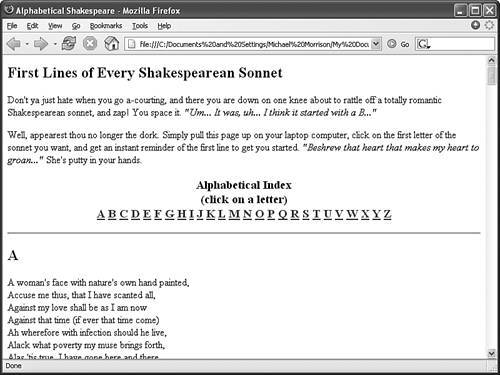 Figure 6.2. Clicking the letter B in the page shown in Figure 6.1 takes you to the appropriate section of the same page.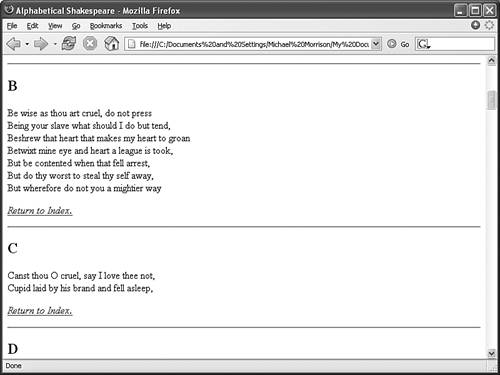
Try It Yourself Hopefully you now have several pages of your own linked together. It's a good time to add an index at the top of your home page so that people can easily get an overview of what your pages have to offer:
|