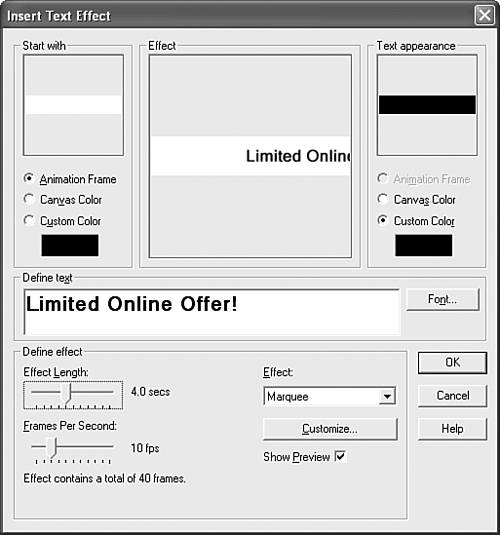
Generating Transitions and Text EffectsAnimation Shop (like some other GIF animation programs) can do much more than just collect multiple GIF images into a single animation file. It can also generate some impressive special effects and even create scrolling text banners all by itself. Unfortunately, there's just not room in this book to explain in detail how to use these features, but they're easy enough that you can probably pick them up on your own with a little help from the Animation Shop online help system. Just to get you started, Figure 7.16 and Figure 7.17 show a transition and text effect being constructed. You use the image transition feature (Effects, Insert Image Transition) to smoothly fade between two banner ads. (You'll see these banner ads used in a JavaScript animation later in the book, in Hour 17, "Web Page Scripting for Nonprogrammers.") The other example uses text transitions (Effects, Insert Text Effect) to scroll the text Limited Online Offer! smoothly across a white background. This didn't require any images at all, because the text transition effects generate their own pictures of the text as they do their magic. Figure 7.16. Use Effects, Insert Image Transition to generate fades, wipes, dissolves, and other automatic transitions between images.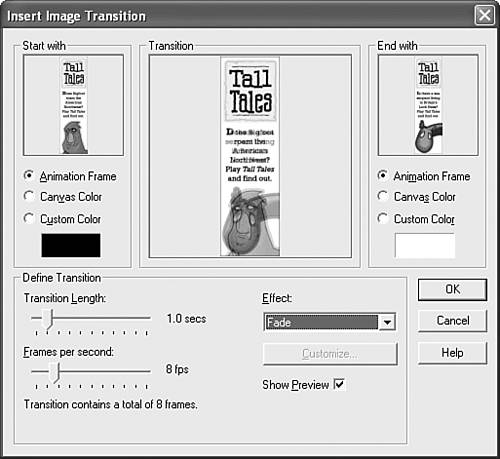 Figure 7.17. Use Effects, Insert Text Effect to generate moving text and special-effect text over a frame or a set of frames.
|