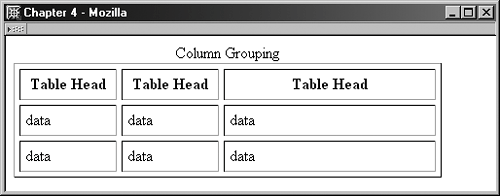
Grouping Table Columns: The col ElementIf you are very concerned about accessibility, or if your data tables are long, it becomes helpful to group columns to keep them organized and logical. Two elements can assist you with grouping columns for better management and accessibility. The first of these elements is the col element. The col element is a way to group columns to specify attributes or apply style. The col element must appear after the caption element, if one exists, and it supports a number of attributes. Of particular importance is the span attribute, which defines how many columns the col element will span. Example 4-14 demonstrates the use of the col element with a span attribute of 2. You'll notice I've also added the width attribute, defining a width, and that the col element requires a trailing slash: <col />. Example 4-14. Using the col element to apply attributes to a number of columns<table width="90%" border="1" cellspacing="5" cellpadding="5" summary="This table explores Figure 4-15 demonstrates how the first two columns are now grouped. The width I've defined in the col element of 100 pixels applies to both columns in the spanned group. Figure 4-15. Grouping columns using the col element.
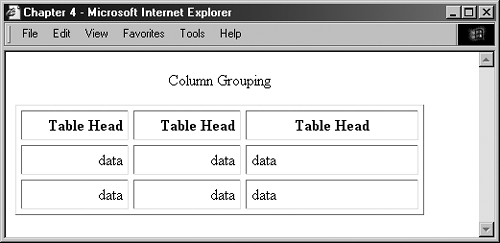
You can add other presentational attributes, too, including the align and valign attributes: <col span="2" width="100" align="right" valign="bottom" /> This markup creates the results found in Figure 4-16. Figure 4-16. Using the col element to apply presentational attributes to multiple columns.
In this case, you'll notice that the headers within the group are right-aligned, as is the text in the group's data cells. If you look closely, you'll also notice that the text is slightly lower in the group than it is in the right column, which isn't part of the group. |
 column grouping">
<caption>Column Grouping</caption>
column grouping">
<caption>Column Grouping</caption>