Adding a Table RowAnother critical building block of an HTML table is the table row, represented by the TR element (see Example 4-3). Example 4-3. A table with a table row<table width="90%" border="1" cellspacing="5" cellpadding="5"> <tr> </tr> </table> Every table requires at least one row. Rows are the horizontal aspects of the table. Although this markup alone will not display in and of itself, I've added the necessary components so you can visualize the row clearly (see Figure 4-3). Figure 4-3. A table with one rowthe spacing between the row's outline and the table's outline is created by the cellspacing and cellpadding attributes.
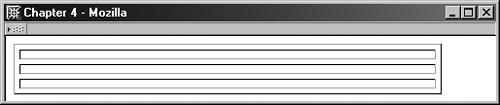
You can add as many rows as your table requires. For the next example, I've added two rows to provide you with an example of three rows within the table. I then added some more markup necessary to help visualize the three rows (see Figure 4-4). Figure 4-4. A table with three rows.
|