Adding Check Boxes and Radio ButtonsCheck boxes are an excellent way to get information from a site visitor from a preset selection of choices. The advantage of check boxes is that visitors can select from more than one option, and that's the best time to use themwhen the possibility of multiple answers exists. To create check boxes, you use the input element along with the type attribute and a value of checkbox (see Example 5-5). Example 5-5. Adding check boxes to the form
<p>Please choose your favorite way(s) to relax:</p>
<input type="checkbox" name="reading" id="reading" />Reading<br />
<input type="checkbox" name="sports" id="sports" />Sports<br />
<input type="checkbox" name="games" id="games" />Computer Games<br />
<input type="checkbox" name="tv" id="tv" />Television<br />
<input type="checkbox" name="movies" id="movies" />Go to the Movies<br />
<input type="checkbox" name="beer" id="beer" />Enjoy a cold beer<br />
<input type="checkbox" name="dogs" id="dogs" />Play with the dogs<br />
<input type="checkbox" name="music" id="music" />Listen to music<br />
<input type="checkbox" name="friends" id="friends" />Meet with friends and
                                                    hang out
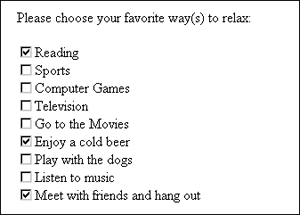
Users can then make selections as they see fit (see Figure 5-4). Figure 5-4. Users can select multiple options from a check box list.
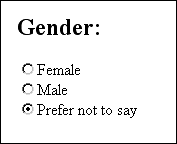
You'll notice that the name and id attributes are set to logically relate to the associated option, and a value attribute is included in each option as well. This is necessary for the check boxes to work. Radio buttons are similar to check boxes, in that they allow your visitor to make selections based on your preset options. However, in the case of radio buttons, the visitor is allowed to select only one option instead of one or more options. This is handled by using the same name value (in this case, gender) and then using the value attribute to distinguish the options. You must use the value attribute in radio buttons, or the unique selection feature will not work (see Example 5-6). Example 5-6. Adding radio buttons to the form<form method="get" action="http://www.myserver.com/cgi-bin/mailscript/"> <h2>Gender:</h2> <input type="radio" value="female" name="gender" id="female" />Female<br /> <input type="radio" value="male" name="gender" id="male" />Male<br /> <input type="radio" value="undisclosed" name="gender" id="undisclosed" /> Prefer not to say </form> Figure 5-5 shows the series of radio buttons described in Example 5-6. Figure 5-5. Choosing from a selection of radio buttons.
Check boxes and radio buttons can be used in any combination you require to best address the needs of your form. The main issue is to remember that check boxes can be used for multiple submissions, whereas radio buttons are limited to one choice only. |