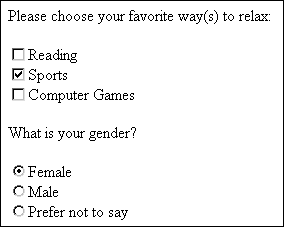
Preselecting Checked ItemsIn some instances you'll use radio buttons or check boxes and want to have items preselected. If your form is geared primarily toward female athletes for example, you can display your check boxes or radio buttons with preselected choices by using the checked attribute. This places a check or a dot in the preselected choice (see Example 5-7). Example 5-7. Adding radio buttons to the form<form method="get" action="http://www.myserver.com/cgi-bin/mailscript/"> <p>Please choose your favorite way(s) to relax:</p> <input type="checkbox" name="reading" id="reading" />Reading<br /> <input type="checkbox" name="sports" id="sports" checked="checked" />Sports<br /> <input type="checkbox" name="games" id="games" />Computer Games <p>What is your gender?</p> <input type="radio" value="female" name="gender" id="female" checked="checked" />Female<br /> <input type="radio" value="male" name="gender" id="male" />Male<br /> <input type="radio" value="undisclosed" name="gender" id="undisclosed" /> Prefer not to say </form> Figure 5-6 shows the preselected results. Figure 5-6. Preselecting check box and radio button options.
|