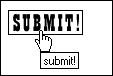
Using a Graphic Submit ButtonIf you'd like your submit button to look more integrated with your visual design, you can create an image and use it for the submit process instead. The caveat here is that this technique does not equally apply for the reset button unless you add JavaScript. But in terms of HTML itself, you can use a custom button for submit if you so desire. For Example 5-12, I created a graphic submit button for my form and inserted it into the form using the input element with additional attributes for the image. Example 5-12. Using a graphical submit button<form method="get" action="http://www.myserver.com/cgi-bin/mailscript/"> <input type="image" src="submit-button.gif" width="75" height="25" alt="submit!" You'll notice that the markup includes a value for the type attribute, image. Then you provide the image source for the button, its width and height, its value, and alternative text. Remember, it's an image, so you'll want to be sure you have that alternative text in there. Figure 5-14 shows the stylized graphic button as the mouse passes over it. You'll notice that the mouse pointer turns to a hand, just as it would for any other link, and the alternative text is displayed, too. Figure 5-14. Implementing a graphic submit button.
QUANTUM LEAP In most contemporary web designs, images are used for submit buttons in tandem with CSS. You've certainly noticed that although the form controls described in the chapter so far are effective and straightforward in terms of implementation, they aren't exactly pretty. That will be repaired as soon as you begin styling form elements later in this book. |
 value="submit" />
</form>
value="submit" />
</form>