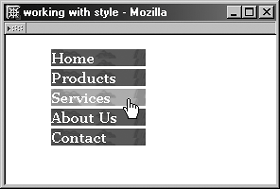
Vertical List Navigation with Image EffectsBy tapping into background graphics and the :hover selector, you can create a navigation list that will have an attractive background for each list item. Add a contrasting background graphic to the hover state for impressive results (see Example 10-12). Example 10-12. Using background images to create sophisticated navigation effects
body {font: bold 15px Georgia, Times, serif; color: black;}
a {color: white; text-decoration: none; display: block;}
a:link {color: white;}
a:visited {color: yellow;}
a:hover {color: white; background-image: url(linkhover.gif);}
a:active {color: red;}
#nav, #nav a, #nav li {width: 100px; margin: 0; padding: 0; list-style-type: none;}
li {background-image: url(linkback.gif); border-bottom: 3px solid white;}
You'll notice that I've set a background graphic for the list item, as well as a background graphic for the hover state. This results in a richly designed navigation bar with visually advanced effects (see Figure 10-18). Figure 10-18. Adding background graphics to the list item and hover state to create graphically rich mouseover effects previously unattainable without JavaScript.
NOTE I've changed the display of the anchor element from inline (in-text) to block (followed by a break). This is necessary to match the width of the anchor element to the width of the list item element so that the hover state's background graphic displays properly across all browsers. |