
| Previous Page | Table of Contents | Next Page |
Recipe 1.1 Specifying Fonts and InheritanceProblemYou want to set the typeface of text on a web page. Solutionp {
font-family: Georgia, Times, "Times New Roman", serif;
}DiscussionYou can specify the fonts you want the browser to render on a web page by writing a comma-delimited list for the value of the font-family property. If the browser can't find the first font on the list, it tries to find the next font, and so on, until it finds a font. If the font name contains spaces, enclose the name with single or double quotation marks. You can enclose all font names in quotes, regardless of whether they contain spaces, but if you do, browsers with poor CSS implementations might not render the fonts accurately. At the end of the list of font choices, you should insert a generic font family. CSS offers five font family values to choose from, as shown in Table 1-1. All web browsers contain a list of fonts that fall into the five families shown in Table 1-1. If a font is neither chosen via a CSS rule nor available on the user's computer, the browser uses a font from one of these font families. The most problematic generic font value is fantasy because this value is a catchall for any font that doesn't fall into the other four categories. Designers rarely use this font because they can't know what symbols will be displayed! Another problematic generic value is cursive because some systems can't display a cursive font. If a browser can't use a cursive font, it uses another default font in its place. Because text marked as cursive may not actually be displayed in a cursive font, designers often avoid this generic font value as well. If you want to use an unusual font that might not be installed on most peoples' machines, the rule of thumb is to set the last value for the font-family property to either serif, sans-serif, or monospace. This will maintain at least some legibility for the user viewing the web document. You don't have to set the same properties for every tag you use. A child element inherits, or has the same property values of, its parent element if the CSS specification that defines a given property can be inherited. For example, if you set the font-family property to show a serif font in a paragraph that contains an em element as a child, that text in the em element is also set in a serif font: <p style="font-family: serif; ">The water fountain with the broken sign on it is <em>indeed</em> broken.</p> Inheritance doesn't occur under two circumstances. One is built into the CSS specification and concerns elements that can generate a box. Elements such as h2 and p are referred to as block-level elements and can have other properties such as margins, borders, padding, and backgrounds, as shown in Figure 1-1. Figure 1-1. The box model for a block-level element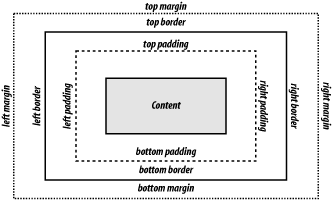 Because these properties aren't passed to child block-level elements, you don't have to write additional rules to counter the visual effects that would occur if they were passed. For example, if you applied a margin of 15% to a body element, that rule would be applied to every h2 and p element that is a child of that body element. If these properties were inherited, the page would look like that shown in Figure 1-2. Figure 1-2. Hypothetical mock-up of margins and border properties being inherited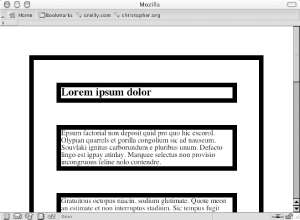 Because certain properties are defined to be inheritable and others aren't, the page actually looks like that shown in Figure 1-3 in a modern CSS-compliant browser. Figure 1-3. How the page looks when block-level elements don't inherit certain properties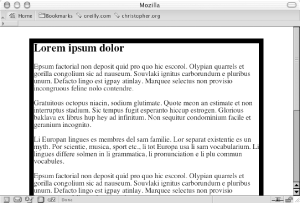 The other circumstance under which inheritance doesn't work is, of course, if your browser doesn't follow the CSS specification. For example, in Netscape Navigator 4, child elements may not inherit the font-family and color values set in a body type selector. To work around this problem, implicitly set the font-family and color values for block-level elements: body {
font-family: Georgia, Times, "Times New Roman", serif;
color: #030;
}
h1, h2, h3, h4, h5, h6, p, td, ul, ol, li, dl, dt, dd, {
font-family: Georgia, Times, "Times New Roman", serif;
color: #030;
}See AlsoThe CSS 2.1 specification for inheritance at http://www.w3.org/TR/CSS21/cascade.html#inheritance; the CSS 2.1 specification for font-family values at http://www.w3.org/TR/CSS21/fonts.html#propdef-font-family; more about CSS and Netscape 4 issues at http://www.mako4css.com/cssfont.htm. |
| Previous Page | Table of Contents | Next Page |