
| Previous Page | Table of Contents | Next Page |
Recipe 1.19 Changing Line SpacingProblemYou want to leave more or less space between lines. Figure 1-34 shows the browser default, and Figure 1-35 shows paragraphs with half as much space again. Figure 1-34. The default leading of a paragraph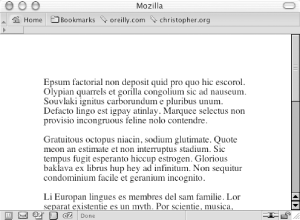 Figure 1-35. Increased leading between the lines of text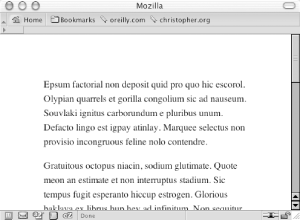 SolutionUse the line-height: P {
line-height: 1.5em;
}DiscussionAs the line-height value increases, the distance between the lines of text grows. As the value decreases, the distance between the lines of text shrinks and eventually the lines overlap each other. Designers refer to the line height as the leading. A line-height value can be a number and a unit such as points, just a number, or a number and a percentage symbol. If the line-height value is just a number, that value is used as percentage or a scale unit for the element itself as well as for child elements. Negative values aren't allowed for line-height. The following example effectively sets the font-size to 12px and the line-height to 14.4px ((10px * 1.2) * 1.2px = 14.4px): body {
font-size: 10px;
}
p {
font-size: 1.2em;
line-height: 1.2;
}You also can set the line-height property with the shorthand font property when paired with a font-size value. The following line transforms any text in a p element to have a font size of 1em, to have a line-height of 1.5em, and to display in a sans-serif typeface: p {
font: 1em/1.5em sans-serif;
}See AlsoThe CSS 2.1 specification on the line-height property at http://www.w3.org/TR/CSS21/visudet.html#propdef-line-height; Recipe 1.6 for more information on the font property. |
| Previous Page | Table of Contents | Next Page |