
| Previous Page | Table of Contents | Next Page |
Recipe 1.9 Stylizing a Heading with Text and an ImageProblemYou want to place a repeating image at the bottom of a heading, like the grass in Figure 1-17. Figure 1-17. A background image used with a heading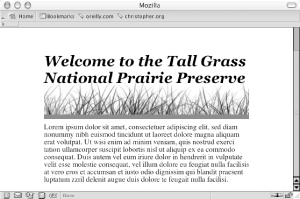 SolutionUse the background-image, background-repeat, and background-position properties: h2 {
font: bold italic 2em Georgia, Times, "Times New Roman", serif;
background-image: url(tall_grass.jpg);

background-repeat: repeat-x;
background-position: bottom;
border-bottom: 10px solid #666;
margin: 10px 0 0 0;
padding: 0.5em 0 60px 0;
}DiscussionMake a note of the height of the image used for the background. In this example, the height of the image is 100 pixels (see Figure 1-18). Figure 1-18. An image of tall grass Set the background-repeat property to a value of repeat-x, which will cause the image to repeat horizontally: background-image: url(tall_grass.jpg); background-repeat: repeat-x; Next, set the background-position property to bottom: background-position: bottom; The background-position can take up to two values corresponding to the horizontal and vertical axes. Values for background-position can be a length unit (such as pixels), a percentage, or a keyword. To position an element on the x axis, use the keyword values left, center, or right. For the y axis, use the keyword values top, center, or bottom. When the location of the other axis isn't present, the image is placed in the center of that axis, as shown in Figure 1-19. background-position: bottom; Figure 1-19. The image aligned on the bottom of the y axis and in the middle of the x axis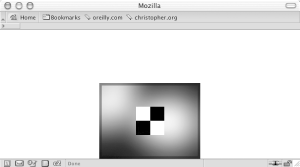 So, in this Solution, the image is placed at the bottom of the y axis but is centered along the x axis. See AlsoRecipe 2.4 for setting a background image in an entire web page. |
| Previous Page | Table of Contents | Next Page |