
| Previous Page | Table of Contents | Next Page |
Recipe 3.7 Creating Collapsible MenusProblemYou want to hide a set of links and give the user a way to reveal those links when needed. For example, rather than two bullet lists of links, hide one (as shown in Figure 3-6) and let the user reveal it by clicking on a + sign as in Figure 3-7. Figure 3-6. Preventing the second set of links from displaying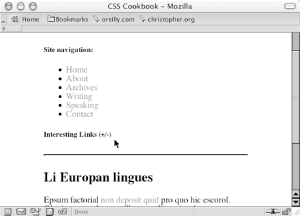 Figure 3-7. The links displayed when the link on the heading is clicked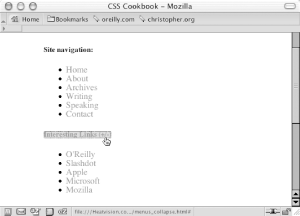 SolutionFirst, set up the HTML links to be collapsible with an id attribute in the ul element: <h5>Interesting Links (+/-)</h5> <ul id="menulink"> <li><a href="http://www.ora.com/">O'Reilly</a></li> <li><a href="http://www.slashdot.org/">Slashdot</a></li> <li><a href="http://www.apple.com/">Apple</a></li> <li><a href="http://www.microsoft.com/">Microsoft</a></li> <li><a href="http://www.mozilla.org/">Mozilla</a></li> </ul> Then create a CSS rule to prevent the second set of links from displaying when the page is first loaded: #menulink {
display: none;
}Now add the following JavaScript function that toggles the list of links by swapping the value of display from block to none, or vice versa: function kadabra(zap) {
if (document.getElementById) {
var abra = document.getElementById(zap).style;
if (abra.display == "block") {
abra.display = "none";
} else {
abra.display = "block";
}
return false;
} else {
return true;
}
}Insert an anchor element with a JavaScript onclick event around the heading. When a user clicks the link, the click triggers the JavaScript function: <h5><a href="#" onclick="return kadabra('menulink');">
Interesting Links (+/-)</a></h5>DiscussionThe JavaScript in this function uses getElementbyId to toggle the display of the list of menu links. This technique can be scaled to show multiple menus or portions of a web document without adding additional lines of JavaScript: <p>Are you sure you want to know the truth? If so,
follow <a href="#" onclick="return kadabra('spoiler'); ">this
link.</a></p>
<p id="spoiler">Darth Vadar was Luke's father!</p>Note that this technique works in Netscape Navigator 6+, Opera 7.5+, Internet Explorer for Windows 5+, and Safari. See AlsoRecipe 2.10, which uses a similar concept to create a dynamic splash page; http://www.mozilla.org/docs/dom/domref/dom_doc_ref48.html, for more information on getElementbyId. |
| Previous Page | Table of Contents | Next Page |